Pages

Showing posts with label Cybersmart. Show all posts

Wednesday, 28 March 2018

How To Be Cybersmart!

Image result for cybersmartThere are a few things you need to know about how to be cybersmart.

Understand that a digital footprint always leaves a trace.
Source: Smart Footprint

Smart Learners will know that teachers are observing because they are navigating through their teachers dashboard. Therefore make sure that you are always on appropriate sites.
Source: Smart Learners

Be cybersmart around others and who you are communicating with online. Source: Smart Relationships

Make sure when you are online shop that you ask for permission and don’t trade, they might be scammers. Source: Smart Money


Don’t copy anyone’s work without their permission. It is called copyright.
Source: Smart And Legal

Friday, 27 May 2016

A Celebration For Parents


After school I went to the road and I saw my mum. She was waiting in the car for me to go home. When I came to her, I told her to come and visit my class to get my new chromebook so she followed me.

When we arrived at my class, I showed her my google drive, class site, class blog and one of my favourite pieces of writing. She read my writing and she was laughing. 

I showed her a form with some questions that she had to do on my chromebook. When she had done it, I could take it home after she had signed a form for Mrs Buchanan.  I showed her why I wanted to take my chromebook home in a video. Fiona, Yayleen and my mum were laughing when they saw the video.  I had to show them what I had to do so she knows what I am learning. Also she could even learn from me what I have done.

I enjoyed eating the snacks with cheese and crackers. The cheese was tasty with the crackers.

Thursday, 26 May 2016

Cybersmart parents!


Saluselo and I made a screencast video for parents about being Cybersmart. Watch us learn to help them learn!

Why I want to take my Chromebook home!

Tuesday, 13 October 2015

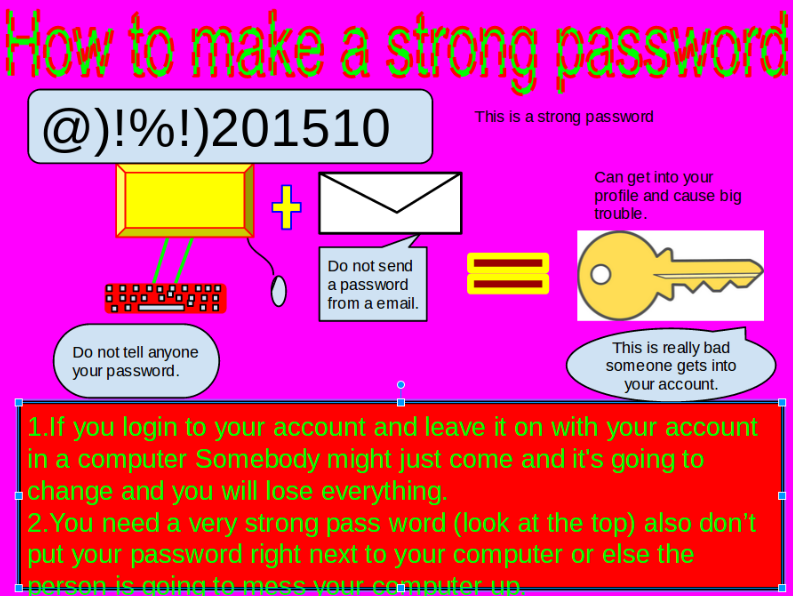
Secure Your Password!!!


We are learning to create strong, unique passwords and make sure our Google account is secure.

Wednesday, 23 September 2015

My top tip is Ctrl + shift ...


Ctrl + shift QQ is quick way to quit your computer. I like Ctrl + shift QQ because it is an easier way to shut down.

Tuesday, 22 September 2015

Vegetables For Life

Robati 1

Kiorana, my name is Robati and I am a Cook Islander. I go to Ruapotaka School. I am 10 years old.  I am a Year five student.

My favourite subjects are reading and maths. My learning goal is to be better than before. My favourite sport is soccer.

I have five sisters and two brothers. I admire my family because they always look after me. My favourite movies are action movies. My dog’s name is KFC. My favourite foods are McDonalds, pizza and vegetables. I love vegetables!